Computer
Parts of a Computer
Learning Objectives
- Name the main parts of a computer.
- Know what each part does.
- Identify the monitor, keyboard, mouse, CPU, and speakers.
- Understand that all parts work together.
Let Us Begin!
Have you seen a computer at home, school, or a shop? A computer is a machine that helps us do many things — write, draw, play games, watch videos, and learn!
Just like our body has many parts (eyes, ears, hands), a computer also has many parts. Each part has a special job. Let us learn about the main parts of a computer.
Main Parts of a Computer
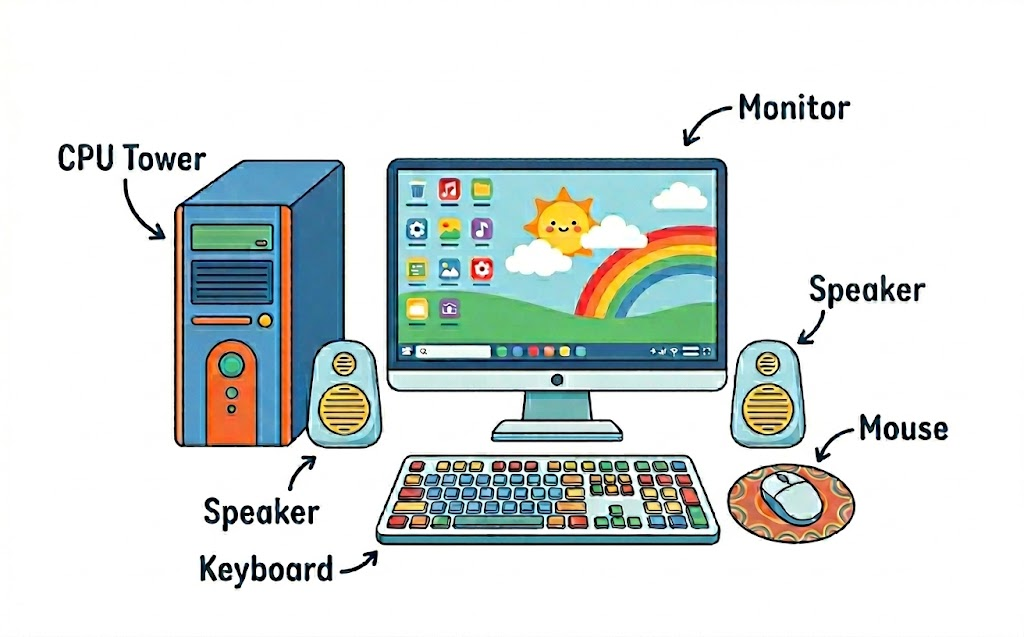
| Part | What it looks like | What it does |
|---|---|---|
| Monitor | Like a TV screen | Shows us pictures, videos, and text. It is the display screen. |
| Keyboard | Has many buttons with letters and numbers | We use it to type letters, numbers, and words. |
| Mouse | Small device that fits in your hand | We move it to point and click on things on the screen. |
| CPU | A box (tower) or flat unit | The brain of the computer. It does all the thinking and processing. |
| Speakers | Small boxes on either side | Produce sound — music, voices, and other audio. |
| Printer | A flat machine | Prints documents and pictures on paper. |
Think about it: Which part of the computer is like our brain? Which part is like our eyes? Which part is like our hands?
The Laptop
A laptop is a small computer you can carry around. It has the monitor, keyboard, and CPU all in one unit. It runs on a battery so you can use it anywhere!
Desktop vs Laptop
Desktop computer: Stays on a table. Has separate monitor, keyboard, mouse, and CPU. Needs to be plugged in.
Laptop computer: Can be carried. All parts are together. Has a built-in battery.
Key Words
| Word | Meaning |
|---|---|
| Monitor | The screen of a computer that displays information |
| Keyboard | A set of keys used to type letters and numbers |
| Mouse | A pointing device used to click and select items on screen |
| CPU | Central Processing Unit — the brain of the computer |
| Laptop | A portable computer with all parts in one unit |
| Printer | A device that prints documents on paper |
⭐ Key Points to Remember
- A computer has many parts — monitor, keyboard, mouse, CPU, and speakers.
- The monitor is the screen. The keyboard is for typing. The mouse is for clicking.
- The CPU is the brain of the computer.
- A laptop is a portable computer with all parts together.
- All parts of a computer work together as a team.
Finished learning? Now test what you know!